# 데이터 분석 및 모델링에 필요한 라이브러리 임포트
import numpy as np
import pandas as pd
import matplotlib.pyplot as plt
import urllib.request
plt.rc('font', family='NanumBarunGothic')

from tqdm import tqdm
from konlpy.tag import Okt
from mecab import MeCab
from sklearn.feature_extraction.text import CountVectorizer

import time
from sklearn.model_selection import train_test_split
from sklearn.feature_extraction.text import TfidfVectorizer

import tensorflow as tf
from tensorflow.keras.preprocessing.text import Tokenizer
from tensorflow.keras.preprocessing.sequence import pad_sequences
from tensorflow.keras.layers import Dense, Flatten, Conv1D, MaxPool2D
from tensorflow.keras.layers import Embedding, Bidirectional, LSTM, SimpleRNN, GRU
from tensorflow.keras.models import Sequential, load_model
from tensorflow.keras.callbacks import EarlyStopping, ModelCheckpoint

from transformers import BertTokenizer, BertForSequenceClassification
import torch
from torch.utils.data import DataLoader, Dataset
from tqdm.auto import tqdm
2. 데이터 전처리
# ratings.txt 파일을 데이터프레임으로 읽어오기
# delimiter='\\t': 탭으로 구분된 데이터
# quoting=3: 따옴표 무시
df = pd.read_csv("ratings.txt", delimiter='\\t', quoting=3)
# 결측치(null)가 있는 행을 제거하여 데이터의 품질을 향상시킴
# inplace=True: 원본 데이터프레임을 직접 수정
df.dropna(inplace=True)
# 중복된 document(리뷰) 개수 확인
df['document'].duplicated().sum()
# 중복된 리뷰 텍스트를 제거하여 데이터의 유니크성 확보
df.drop_duplicates(subset=['document'], inplace=True)
df.info()
2-1. 한글 데이터만 남기기
# 한글과 공백을 제외한 모든 문자 제거
# 정규표현식 [^가-힣 ]를 사용하여 한글과 공백이 아닌 문자를 ''로 대체
# str.contains()로 한글/공백 외 문자가 있는지 확인하고 합계 계산

df['document'] = df['document'].str.replace('[^가-힣 ]','', regex=True)
df['document'][df['document'].str.contains('[^가-힣 ]')].sum()
2-2. 불용어 제거
# Mecab 형태소 분석기 시작
mecab = MeCab()

# 문장에서 제거할 불필요한 조사들 정의
stopwords = set(["은", "는", "이", "가", "을", "를", "에", "의", "와", "과", "도", "다"])

# 텍스트에서 불용어를 제거하는 함수
def remove_stopwords(text):
    words = mecab.morphs(text) # 문장을 형태소 단위로 분리
    return ' '.join([word for word in words if word not in stopwords])

# 전체 데이터에 불용어 제거 함수 적용 (진행바 표시)
tqdm.pandas(desc="불용어 제거 중")
df['document'] = df['document'].progress_apply(remove_stopwords)
df.tail(3)
# label '감정' 분포 확인 : 총 6개이며, 고루게 분포 확인. 단 기쁨이 약간 부족해 보임
df['label'].value_counts()
3. 데이터 분리
# 데이터와 라벨을 분리하여 각각의 변수에 저장

x = df['document']
y = df['label']

x.shape, y.shape
A. LSTM 모델링
1. 데이터 분리
# 데이터를 학습용(80%)과 테스트용(20%)으로 분리
# stratify: 라벨의 비율을 유지하면서 분할
# random_state: 재현성을 위한 시드값 설정
x_train, x_test, y_train, y_test = train_test_split(
	x, y ,
	test_size=0.2,
	stratify=y,
	random_state=41
)

# 분리된 데이터의 shape 확인
x_train.shape, x_test.shape, y_train.shape, y_test.shape
2. 데이터 토큰화 및 패딩
# Tokenizer 객체 생성 및 학습 데이터로 단어 사전 구축
tokenizer = Tokenizer()
tokenizer.fit_on_texts(x_train)

# 각 단어에 고유한 정수 인덱스 할당 결과 확인
print(tokenizer.word_index)

# 인덱스를 단어로 변환하는 매핑 확인
print(tokenizer.index_word)

# 각 단어가 학습 데이터에서 등장한 횟수 확인
print(tokenizer.word_counts)

# 전체 단어 사전 크기 계산 (총 47,646개 단어)
max_words = len(tokenizer.index_word)
print(max_words)
# 텍스트 데이터를 정수 시퀀스로 변환
# texts_to_sequences: 각 단어를 해당하는 정수 인덱스로 변환
x_train_seq = tokenizer.texts_to_sequences(x_train)
x_test_seq = tokenizer.texts_to_sequences(x_test)

# 변환 전/후 결과 비교 출력
print(x_train[1:3])  # 원본 텍스트
print(x_train_seq[1:3])  # 정수 시퀀스로 변환된 결과
# 문장의 최대 길이 찾기
maxlen = max(len(line) for line in x_train_seq)

# 모든 문장을 동일한 길이로 맞추기 위해 패딩 적용
# 짧은 문장은 앞에 0을 채우고, 긴 문장은 maxlen 길이로 자름
x_train_pad = pad_sequences(x_train_seq, maxlen=maxlen)
x_test_pad = pad_sequences(x_test_seq, maxlen=maxlen)
# 문장 Seq 패딩의 shape 확인
x_train_pad.shape, x_test_pad.shape
3. LSTM 모델 구조 설계
# 모델 학습에 필요한 기본 설정값들
max_words = 47646 + 1    # 전체 단어 수 + 패딩용 0
max_len = 42             # 입력 문장의 최대 길이
embedding_dim = 64       # 단어 벡터의 차원
# Sequential 모델 초기화
model = Sequential()

# Embedding 층: 단어를 64차원의 의미있는 벡터로 변환
model.add(Embedding(max_words, embedding_dim, input_length=max_len))

# 2개의 LSTM 층을 쌓아 시퀀스 데이터 학습
model.add(LSTM(16, return_sequences=True))  # 첫 번째 LSTM 층
model.add(LSTM(16, return_sequences=True))  # 두 번째 LSTM 층
model.add(Flatten())  # 다차원 데이터를 1차원으로 평탄화

# 완전연결층(Dense) 추가
model.add(Dense(128, activation='swish'))  # 은닉층 1
model.add(Dense(32, activation='swish'))   # 은닉층 2
model.add(Dense(2, activation='softmax'))  # 출력층 (긍정/부정 분류)

# 모델 컴파일: 손실함수, 최적화 알고리즘, 평가지표 설정
model.compile(
    loss = 'sparse_categorical_crossentropy',  # 다중 분류용 손실함수
    optimizer = 'adam',                        # Adam 최적화 알고리즘
    metrics = ['accuracy']                     # 정확도로 성능 평가
)
model.summary()
# 모델 학습 시작
# - epochs=50: 전체 데이터셋을 50번 반복 학습
# - batch_size=512: 한 번에 512개의 샘플로 가중치 업데이트
# - validation_data: 테스트 데이터로 모델 성능 검증
# - callbacks: early stopping과 checkpoint 저장 기능 사용

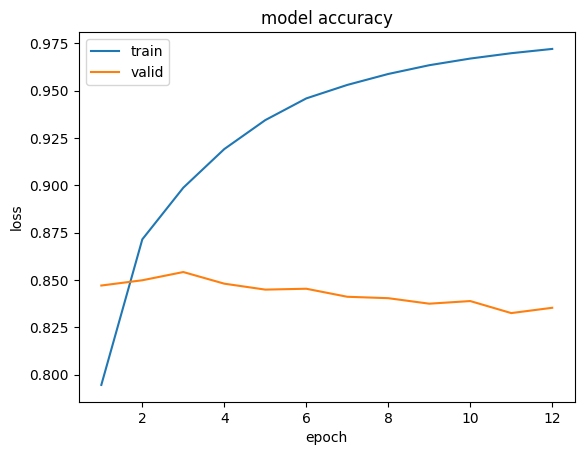
history = model.fit(
	x_train_pad, y_train,
	epochs=50,
	batch_size=512,
	validation_data=(x_test_pad, y_test),
	verbose =1,
	callbacks=[es, cp]
)
# 모델의 성능을 평가(test set에 대한 loss와 accuracy 계산)
model.evaluate(x_test_pad, y_test)
# 테스트 데이터에 대한 예측 수행
# model.predict()를 사용하여 각 리뷰의 감성(긍정/부정) 확률 계산
pred = model.predict(x_test_pad)

labels = np.argmax(pred, axis=1)

result_df = pd.DataFrame({
    "id": np.arange(1, len(labels)+1),
    "label": labels
})

result_df.to_csv("result.csv", index=False)
B. KoBERT 사용
1. 데이터 분리 및 토큰화
# 데이터를 학습용(80%)과 테스트용(20%)으로 분리
train_ds, test_ds = train_test_split(df, test_size=0.2, random_state=42)

# 학습 데이터와 레이블을 리스트로 변환
x_train = train_ds['document'].astype(str).tolist()
y_train = train_ds['label'].tolist()

# 테스트 데이터와 레이블을 리스트로 변환
x_test = test_ds['document'].astype(str).tolist()
y_test = test_ds['label'].tolist()
# KoBERT 모델 및 토크나이저 설정
model_name = 'monologg/kobert'
tokenizer = BertTokenizer.from_pretrained(model_name)

# 학습 및 테스트 데이터를 토큰화하고 패딩 처리
# truncation=True: 최대 길이를 초과하는 텍스트를 자름
# padding=True: 모든 시퀀스를 동일한 길이로 맞춤
train_encodings = tokenizer(x_train, truncation=True, padding=True)
test_encodings = tokenizer(x_test, truncation=True, padding=True)
2. 데이터셋 및 데이터로더 설정
# PyTorch Dataset 클래스를 상속받아 커스텀 데이터셋을 생성하고 데이터로더를 설정하는 코드
class CustomDataset(torch.utils.data.Dataset):
    def __init__(self, encodings, labels):
        self.encodings = encodings  # 인코딩된 입력 데이터
        self.labels = labels        # 레이블 데이터

    def __getitem__(self, idx):
        # 특정 인덱스의 데이터를 텐서로 변환하여 반환
        item = {key: torch.tensor(val[idx]) for key, val in self.encodings.items()}
        item['labels'] = torch.tensor(self.labels[idx])
        return item

    def __len__(self):
        return len(self.labels)     # 데이터셋의 전체 길이 반환

# 데이터로더 설정
train_ds = CustomDataset(train_encodings, y_train)     # 학습용 데이터셋
test_ds = CustomDataset(test_encodings, y_test)        # 테스트용 데이터셋
batch_size = 64                                        # 배치 크기 설정
train_loader = DataLoader(train_ds, batch_size=batch_size, shuffle=True)
test_loader = DataLoader(test_ds, batch_size=batch_size, shuffle=False)
# KoBERT 모델을 로드하고 이진 분류(긍정/부정)를 위해 레이블 수를 2로 설정
model = BertForSequenceClassification.from_pretrained(
	'monologg/kobert',
	num_labels=2
)
3. KoBERT 모델 학습
# KoBERT 모델 학습을 위한 메인 학습 루프 (epochs, optimizer 설정 및 loss 계산)

device = torch.device('cuda' if torch.cuda.is_available() else 'cpu')  # GPU 사용이 가능한 경우 설정

start = time.time()

num_epochs = 5
learning_rate = 2e-5 #2e-5는 0.00002
optimizer = torch.optim.Adam(model.parameters(), lr=learning_rate)
criterion = torch.nn.CrossEntropyLoss()
model.to(device) # GPU 사용이 가능한 경우

for epoch in range(num_epochs):
    model.train() # 훈련 모드 지정
    total_loss = 0

    for batch in tqdm(train_loader):
        input_ids = batch['input_ids'].to(device)
        attention_mask = batch['attention_mask'].to(device)
        labels = batch['labels'].to(device)

        optimizer.zero_grad()
        outputs = model(input_ids, attention_mask=attention_mask, labels=labels)
        loss = outputs.loss
        total_loss += loss.item()

        loss.backward()
        optimizer.step()

    average_loss = total_loss / len(train_loader)
    print(f"Epoch {epoch+1}/{num_epochs} - Average Loss: {average_loss:.4f}")

end = time.time()
print(f'총학습시간: { end - start }')
4. 모델 성능 평가
# 모델을 평가 모드로 설정하고 테스트 데이터셋에 대한 정확도를 계산

model.eval()
correct_predictions = 0
total_predictions = 0

with torch.no_grad():
    for batch in test_loader:
        input_ids = batch['input_ids'].to(device)
        attention_mask = batch['attention_mask'].to(device)
        labels = batch['labels'].to(device)

        outputs = model(input_ids, attention_mask=attention_mask)
        _, predicted_labels = torch.max(outputs.logits, dim=1)

        correct_predictions += torch.sum(predicted_labels == labels).item()
        total_predictions += labels.size(0)

accuracy = correct_predictions / total_predictions
print(f"Test Accuracy: {accuracy:.4f}")


댓글